ERP cloud migrations are becoming more and more important for businesses all around the world. Businesses that had to hurry to do business remotely in 2020 have sped up the process of moving their operations to the cloud. When the survey was done, sixty-five percent of organizations were already using cloud technologies to run their operations.
Cloud migration services are becoming more popular as a cost-effective substitute for on-site corporate system maintenance. When a corporation installs hardware on-site, there are several expenses involved, such as electricity bills, software license fees, data backup, IT services, and more.
Another essential element driving the rise in cloud migrations is security. Securing hardware on-site calls for strong firewalls, encryption, and security specialists.
ERP software is utilized by over 70% of large enterprises.
Compared to on-site data infrastructure, public cloud services have at least 60% fewer security breaches. In this post, we will delve further into the definition of ERP, how you can migrate your ERP to the Cloud, and the advantages and difficulties of this process.
What Is ERP?
Enterprise Resource Planning (ERP) is a comprehensive software solution that integrates various business processes to facilitate information sharing, streamline operations, and support data-driven decision-making.
A single picture of corporate operations is made possible by the centralization of data from several departments, including accounting, human resources, project management, supply chain management, and more.
ERP systems improve productivity by eliminating human mistakes, streamlining workflows, and automating repetitive operations. They give managers instant access to real-time insights into key performance indicators (KPIs), allowing them to act swiftly and decisively.
Better internal communication is promoted, departmental goals are in line with the overarching company plan, and customer service is enhanced by this integrated approach, which offers a comprehensive perspective of client interactions.
Scalable and adaptable, modern ERP solutions meet the specific requirements of companies across all sectors and sizes. They frequently include cutting-edge technology to improve operational efficiency and predictive analytics capabilities further, such as artificial intelligence (AI), machine learning, and Internet of Things (IoT) integration.
ERPs dismantle organizational silos by providing a single source of truth, fostering improved cooperation, higher output, and lower costs.
Additionally, they support regulatory compliance by keeping accurate and consistent records, which are necessary for reporting and audits. ERP systems are essential instruments for handling a variety of corporate activities, guaranteeing competitiveness and agility in a market that is constantly changing.
The global Enterprise Resource Planning Software market is expected to experience a 4.78% growth from 2023 to 2028, reaching a market volume of US$62.36 billion by 2028.
What’s ERP Cloud Migration?
The act of migrating an organization's apps, data, and work processes onto a platform that is hosted in the cloud is referred to as cloud migration in general. The process of migrating an organization's enterprise resource planning (ERP) system to the cloud is what is meant by the term "ERP cloud migration."
When we discuss moving ERP to the cloud, certain businesses prefer to entirely replace their current ERP system with a cloud-based alternative rather than making the migration.
According to 2021 reports, In 2020, more than the majority of businesses who were in the market for new ERP software chose a cloud-based solution rather than an on-premises system.
Other businesses want to keep utilizing their existing system, but they want to run it over the cloud instead. Both of these are good instances of moving ERP software to the cloud.
Main Benefits Of Moving Your ERP To The Cloud
Business Continuity
A single point of failure in hardware can occur on an on-premises server. Even a single component failure might have catastrophic effects on the system's functionality and result in several days of unavailability.
The cloud environment is inherently trustworthy, and the service also comes with monitoring, the most recent security patches, and backups. In the worst-case scenario, downtime in a cloud environment is only a few hours as opposed to many days with an on-premises server.
Using pre-made cloud technologies may quickly increase fault tolerance without requiring significant financial commitments. For instance, you can increase the frequency of backups and store the data in several physical places.
Since traditional on-premises solutions don't have the same dangers as cloud services, professional-grade security controls are implemented. In light of this, businesses must use reliable and high-quality network connections.
Scalability And Performance
Scalability is a significant benefit of the cloud system. Performance may be readily scaled up and is not dependent on any specific physical infrastructure. When web technology is combined with a centrally located cloud data center, network latency is also decreased.
Utilizing web technology, cloud services are accessed through a browser. As a result, end customers may utilize the system wherever they choose and on their preferred devices. In reality, end users may access the service from anywhere without a VPN and no longer require a separate remote-use solution.
Predictable Costs
The use of the cloud by a SaaS solution results in predictable and scalable prices. The quantity of stored data and the number of end users determine pricing. As a result, purchasing separate licenses for various technological components or infrastructure is no longer necessary.
The service also includes database licensing. Since SaaS solutions are paid for on a monthly basis, expenses are predictable and simple to control. The majority of the physical infrastructure required for the prior on-premises system may be removed after your traditional ERP has been moved to the cloud.
The elimination of the need for maintenance for remote-use solutions results in savings on the upkeep of technological infrastructure. Also, the SaaS solution releases funds that were before invested in your IT infrastructure for use in other profitable endeavors.
Tips For A Successful ERP Software Migration
Learn From Experience
It is unlikely that an ERP migration project will be your first foray into the cloud because there are so many cloud-based products now available. This is excellent news considering that contrary to popular belief, "experience is the best teacher."
Utilizing your past experiences can influence your ERP migration checklist at present. To put this into practice, you will need to work together with anybody who was previously involved in a migration, including executives, engineers, IT personnel, and end users.
You will be better able to predict any potential bottlenecks and hidden expenses involved with relocation if you work together. You will also be able to evaluate potential issues with networking, storage, privacy, and security before they manifest themselves.
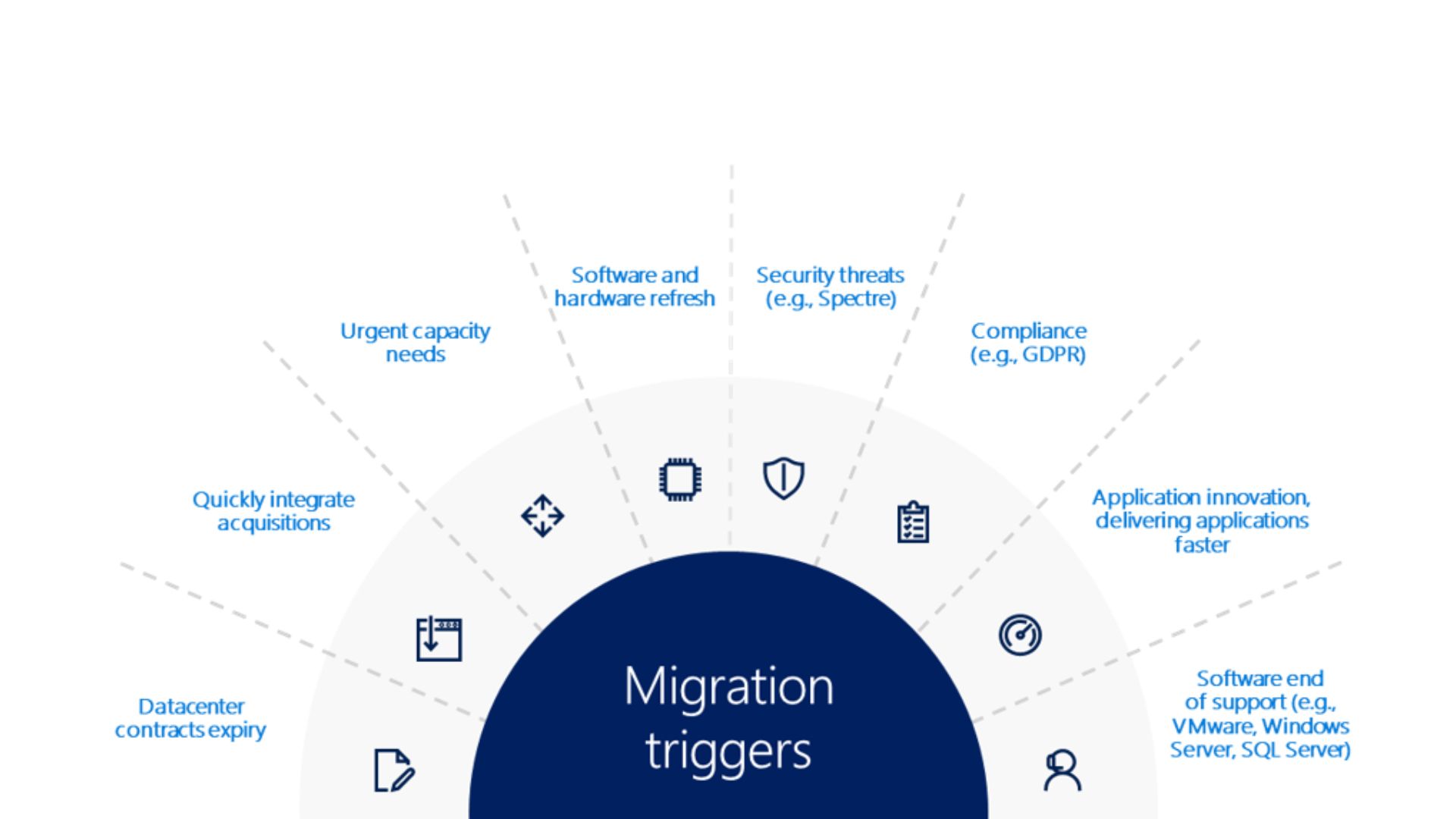
Develop A Strategy For Data Migration
Moving your software from on-premises to the cloud is only complete with first completing the time-consuming and perhaps most crucial task of data transfer. We strongly advise devising a comprehensive data transfer plan in order to ensure a successful move.
Reviewing your process, figuring out what data needs to be moved, cleaning the data, and converting the data are some of the processes that we recommend doing before attempting to migrate your data properly. When you develop a plan to migrate, there should already be a strategy in place that guarantees the data movement will be accurate and comprehensive.
Consider Security And Best Practice
When businesses first started considering moving their ERP systems to the cloud, one of their key concerns was security. On the other hand, as a result of the maturation of technology, cloud providers' capabilities to control the security of their platforms have undergone a significant transition in recent years.
One helpful comparison to make is with public utilities. In the past, businesses were required to provide their energy, but nowadays, they may outsource this responsibility to utility companies, which are both more dependable and more cost-effective.
In the same vein, businesses are increasingly outsourcing their information technology infrastructure to third-party corporations that are able to both provide their estate and safeguard it.
The most significant security risk posed by cloud platforms is the same risk posed by any other platform: inadequate controls and mistakes made by humans. Whenever you are planning an ERP migration, you need to make sure that you schedule enough time to establish best practice security rules and that every member of your team knows those standards.
Be Aware Of Your Vendor’s Data Gravity
When it comes to ERP migration projects, the most common mistake used to be delaying the transfer for too long, when confronted with the knowledge that their competitors who had made the transition to the cloud earlier are now much ahead of them, organizations would linger with their legacy systems for a little bit longer than necessary and then switch to the cloud in a reactionary manner.
However, it is becoming more and more evident that one of the most significant mistakes is making the transition without giving due regard to vendor alliances and their "data gravity." This might lead to difficulties with the adoption of ERP systems as well as other ERP-related challenges.
What exactly is the "data gravity?" To put it another way, it is a measurement of how difficult it would be to switch away from a cloud provider in the event that it was necessary to do so in the future.
One of the most appealing aspects of cloud computing is the ease and speed with which data may be moved from one platform to another. However, moving to a different cloud platform at a later date is expensive.
It is necessary to plan your ERP migration properly, select the appropriate provider from the beginning, and be aware of their "data gravity." Refrain from letting the seeming lack of complexity of the move intimidate you. Ask them how tough it would be to move away in the future if that was the path your company wanted to take.
Get Ahead Of Privacy Compliance
The sovereignty of one's data is currently a prominent subject. To this aim, you need to make sure that your cloud ERP system complies with local and international privacy requirements, such as the General Data Protection Regulation (GDPR) and the California Consumer Privacy Act (CCPA), amongst others.
This is especially crucial given that you will have little control over the location where your applications are stored. In point of fact, copies of them will likely be kept in a number of different cloud availability zones.
Post Migration Strategies
To guarantee they get the most out of this digital transition, businesses need to concentrate on post-migration plans after successfully moving an ERP system to the cloud. These tactics are essential for maximizing the benefits of cloud ERPs and preserving their effectiveness, security, and conformity with organizational objectives.
System Monitoring And Optimization
- Continuous Monitoring- To guarantee the new ERP system operates without hiccups, regular monitoring is necessary. This includes monitoring resource usage, user activity, and system performance.
- Performance Optimization - Organizations should improve the system for optimal performance based on the insights gathered from monitoring. This might entail updating system components, optimizing procedures, or modifying how resources are allocated.
Training And Support
- Employee Training- It's crucial to teach staff members about the new system after the migration. Ongoing training and assistance aid in acclimating to the new features and interface, guaranteeing efficient use of the ERP.
- Support Structure- By providing a solid support system, such as a help desk and online tools, users may solve problems and get the answers they need, which increases user happiness and efficiency.
Compliance And Security
- Regular Security Audits- Frequent security audits assist in finding weaknesses and guarantee that the system complies with the most recent security guidelines.
- Compliance Management - It is essential to make sure the system conforms to all applicable rules and regulations. Upgrades and inspections should be carried out often to maintain compliance.
Input And Ongoing Enhancement
- Gathering Feedback- Gathering user input can yield insightful information about possible enhancements and user happiness.
- Iterative Improvements- By putting in place a cycle of continuous improvement, which is based on performance statistics and user input, the system may be improved, and new features can be added to meet changing business demands.
Future Proofing
- Keeping Current- Maintaining the ERP system's relevance and efficacy requires keeping it updated with the newest features and technology.
- Scalability - Long-term success depends on the ERP system's ability to expand and adapt to changes in the business.
Organizations can make sure that their move to a cloud-based ERP system not only satisfies their current business requirements but also puts them in a position for future development and adaptation in the ever-changing digital world by concentrating on these post-migration measures.

Challenges In Migrating ERP To The Cloud
For any firm, moving an Enterprise Resource Planning (ERP) system to the cloud may be a difficult and demanding task. A smoother transition may be achieved by concentrating on the four main difficulties and their answers, even though there are many possible obstacles.
Data Migration Complexity
It can be challenging to move data from an ERP system that is currently in place to a cloud-based platform, especially for businesses that have large data sets or intricate data structures. It takes careful preparation to overcome this.
This entails carrying out a thorough examination of the existing data architecture, selecting the appropriate tools and methods for effective data transfer, and cleaning data to guarantee correctness. Minimizing operational interruptions and controlling complexity may also be achieved by using incremental migration solutions, which include moving data in stages.
System Integration And Compatibility
Another major problem is making sure the new cloud-based ERP interacts seamlessly with current apps and systems. To overcome this, a thorough grasp of the current IT setup and the thoughtful selection of a cloud ERP solution that works with these systems is necessary.
By offering a layer that links different systems and makes data flow between them simpler, middleware or integration platforms as a service (iPaaS) solutions can help integration go more smoothly.
Change Management And User Adoption
The migration process may be hampered by resistance to change and difficulty adjusting to new technology. Organizations must make significant investments in change management and training programs to solve this.
Facilitating the transition and promoting user acceptance may be achieved by outlining the advantages of the new system, offering practical training, and setting up a support network for users.
Organizations can effectively manage change, plan for the challenges, and successfully migrate their ERP to the cloud by employing strategic planning, thoughtful technology selection, diligent financial planning, and effective change management.
Migrate Your ERP To The Cloud - FAQs
How Long Does It Typically Take To Migrate An ERP System To The Cloud?
The complexity of the current system, the amount of data, and the unique needs of the company all influence how long it takes to migrate an ERP to the cloud.
Is Data Loss A Risk During ERP Cloud Migration, And How Can It Be Prevented?
While there is always a chance of data loss during migration, this risk may be reduced by employing solid data backup and recovery plans, carrying out extensive testing at every stage of the process, and utilizing dependable data transfer tools and methods.
Can A Cloud-Based ERP Be Customized To Fit Specific Business Needs?
Absolutely, there are ways to customize cloud-based ERPs to meet particular corporate needs.
Conclusion
Migrate your ERP to the Cloud is a calculated risk that has significant benefits for companies looking for efficiency, scalability, and a competitive edge. Even if there are several challenging aspects of the process, such as data transfer, system integration, user adoption, and cost management, these issues may be successfully resolved with proper preparation and execution.
Adopting cloud-based ERP systems improves data security and accessibility and reduces costs, all of which are in line with the dynamic character of today's company settings. Cloud ERP is becoming more and more important as businesses continue to traverse the digital transformation process because it fosters innovation, agility, and long-term success in the dynamic corporate environment.