When a lot of people jump into a chat during a live event, everyone wants to see instantly who's there or typing. That's how chat apps work today, it could be social media or big online gatherings.
Based on real-world experience building these systems, here are the key pieces you need. These approaches handle huge volumes, like billions of messages every month. Developers can use them with their own tools to keep chats snappy and alive.
How Live Chats Actually Work

How Live Chat Works And How It Can Help Your Business Grow?
Live chats stay instant because of the use of WebSockets. They keep a constant link between your device and the server, so updates happen right away. No more waiting or constant checking. This matters most when lots of people chat at once.
- When you join a chat room, your device connects directly to the server.
- The server gives you a special ID to track if you’re online.
- If you disconnect, everyone in the chat sees you’re offline immediately.
Handling huge crowds needs smart routing. Load balancers send your traffic to the same server each time. This avoids losing your chat status. Big services handle this smoothly for millions of users.
- You see typing indicators or reactions live.
- The connection quietly checks if you’re still there, updating who’s active.
Worldwide chats stay fast thanks to servers in many locations. Most connections feel instant, even across continents.
Keeping Track Of Who's Online
Regular Check-Ins
Your app sends a quick signal every 5–10 seconds to our server. This tells us you’re still active. If we stop getting these signals, we mark you offline and update your contacts.
Why It’s Efficient
- Handles huge crowds (like 50,000 people chatting) without slowing down
- Only processes changesinstead of constant checks
- Cuts network traffic by up to 90%
Works Across All Your Devices
Updates your status smoothly whether you’re on phone, tablet or computer. Change your profile on one device.
Reliable By Design
- Chat check-ins: every 5–10 seconds for accuracy
- Battery-friendly intervals for smart devices
- We watch signal success rates 24/7. If anything drops below 99.999%, alarms go off instantly
- That’s why you can trust "last seen" times, they’re almost never wrong
How Redis Tracks People
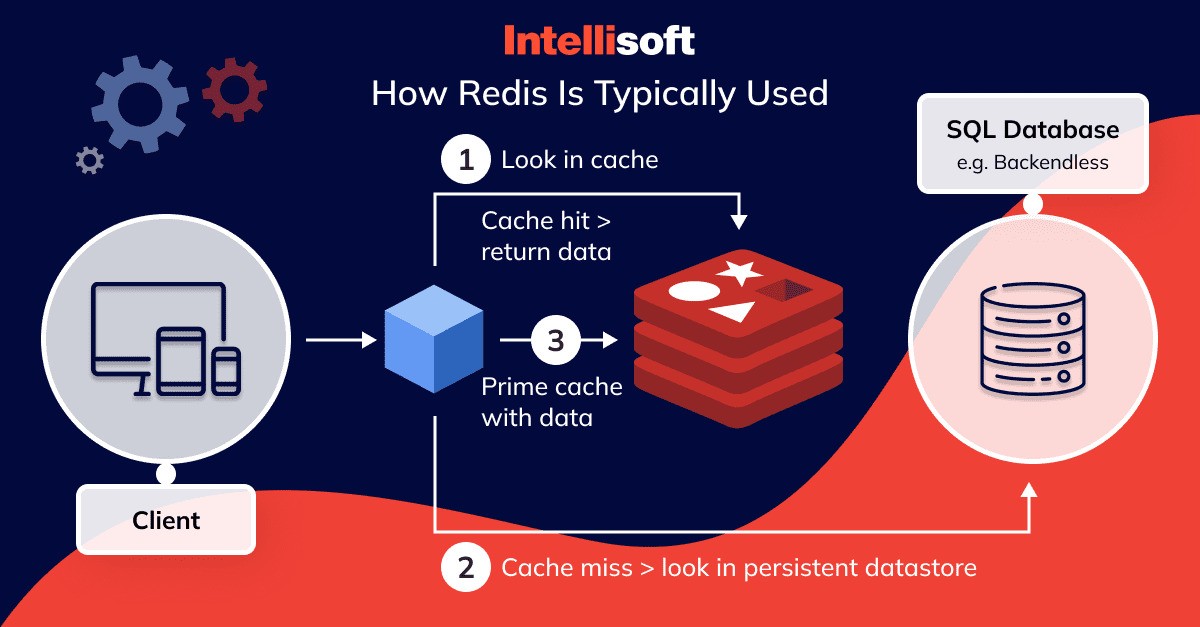
Redis is great for tracking who's online because it's fast and handles live updates well.
- Storing statuses - We store each user's online status directly in Redis. Finding someone's status happens almost instantly.
- Handling big crowds - For very large apps (over a million daily users), Redis spreads user data across many servers. This stops any single server from getting overloaded.
- Spreading updates - When someone's status changes, Redis instantly tells all the right servers. This keeps the storage separate from the delivery system, so each part can scale on its own.
- Cleaning up - Redis automatically removes idle users after a set time. This keeps memory usage low.
- Routing messages - For huge message volumes (like 100 million daily), Redis helps direct messages to the correct server by remembering which server each user is connected to.
Presence Updates In Big Chat Apps
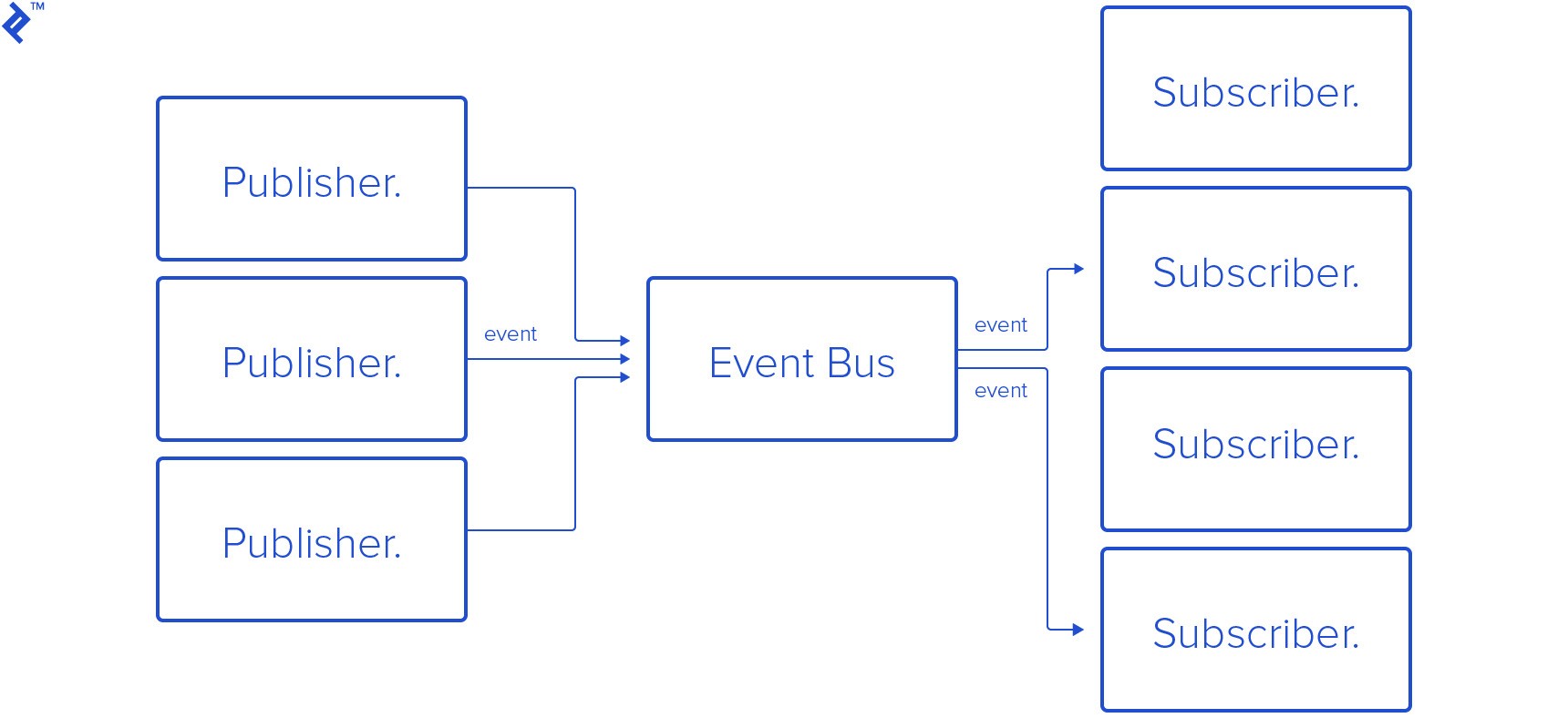
Big chat systems use pub/sub (publish-subscribe) to share when users come online, go offline, or do things like start typing. Here's how it works simply:
- Sending updates - When something happens (like a user coming online), the server sends a quick message to a specific channel, like "user-status."
- Getting updates - Other parts of the system listen to these channels. When they get a message, they tell the right users' apps.
- Handling the load - Tools like Kafka or RabbitMQ handle the huge number of messages safely. They make sure each update arrives just once, even if things get busy.
- Staying flexible - This setup keeps different parts of the system separate. We can make one part bigger without touching the others.
- Keeping it private - Anonymous chats show real-time presence without revealing identities, this is how to connect with people anonymouslyat scale. It handles huge traffic smoothly, so chats stay private and never slow down.
- Saving resources - For group chats, we organize updates by room. This avoids sending the same update to everyone unnecessarily.
- Easy for apps - Services like Pusher connect the backend to user apps. Servers send updates to the messaging tool, which then pushes them instantly to apps using WebSockets. This handles over a million users smoothly.
Handling More Users Smoothly
Spreading The Workload

We use tools called load balancers. They send each user's connection to the best available server for real time communication. This keeps users connected to the same server during their session. If traffic gets heavy, we automatically add more servers based on actual usage.
Splitting Up Data
Instead of putting all user data on one server, we spread it across many. Each server handles a chunk of users or chat rooms. When we add or remove servers, the system adjusts smoothly without stopping service. Big services with millions of users do this for their databases.
Working Across Locations
For users worldwide, we run servers in multiple regions. These locations share online status updates quickly. Local servers handle nearby users, making responses faster. Top services use this setup to stay reliable almost all the time.
Managing Sudden Spikes
Each server handles only part of the total users. Reading data happens separately from updating it, using extra copies. This handles big rushes, like 50,000 people joining a virtual event at once.
Testing It Out
We test with tools that mimic heavy traffic to see how the system holds up. New changes roll out slowly while we check everything works right. This keeps chats and status updates moving smoothly everywhere.
Typing Indicators & Reactions
When someone starts typing, their app sends a quick signal. Others see "typing..." until they send a message or stop. People can react to messages with emojis. The system counts these instantly so everyone sees live reactions. Even in chats where messages disappear after a day, reactions update smoothly.
These features connect through online status. If you're active, you see reactions and typing signs right away. Social apps use this to keep people engaged without extra work on the backend.
Automated filters check reactions for harmful content. Admins can also set rules for who sees what. For support chats, it sends customers to available agents based on who's online. Big platforms use this setup for billions of messages every month. It keeps users coming back. People can choose to hide their typing status if they prefer.
Read Also: How Cloud Services Are Changing Business Operations Across Nigeria
Keeping Things Running When Stuff Breaks
We keep your status updates safe by copying them to different locations. If one server fails, another takes over instantly. When you go offline, we save your status changes temporarily. Once you're back online, your device catches up on what it missed using timestamps.
If a status update fails completely, we set it aside for later retry. Using unique IDs ensures you never get duplicate updates. For temporary statuses, old updates automatically disappear after a set time. Status channels close when your app runs in the background and reopen when you return.
We regularly test how the system handles outages to improve it. Strict uptime promises give businesses confidence. You keep using the service smoothly, without annoying interruptions.
Faster Apps, Everywhere
- Put servers closer to people - Instead of sending data across the world, we place small servers near users. Big networks use hundreds of these spots. Most connections then take under 50 milliseconds like a quick text reply.
- Speed up static content - CDNs store images and files on those nearby servers. This takes pressure off the main system.
- Smarter data transfer - We shrink data size with compression. For small group chats, direct connections between users cut down central server work. Data stays synced reliably across different regions too.
- Handle real-world hiccups - Mobile networks vary. Our system sends local check-ins to the closest server, smoothing out delays. Tools like Datadog watch for sudden slowdowns.
- Smart cost control - Grouping requests together matches cloud billing models. You pay for what you use, and heavy usage gets better rates. Scale up during busy times without surprise bills.
FAQs About Real-Time Presence At Scale For Chat
How Do You See If Someone's Online Right Now?
It checks if people are active like online or typing in chat apps, even with millions of users. Updates happen almost instantly, making chats feel alive and responsive.
How Do Quick Check-ins Keep Track Of Who's Active?
People’s apps send tiny signals to the server every few seconds. If those stop, we know they’re gone, no constant checking needed. This handles sudden spikes without crashing.
Why Use Redis For Tracking Who’s Online?
It’s super quick for checking statuses and sending updates to everyone in a chat. It handles huge crowds smoothly by spreading the work across multiple servers.
What’s Best For Sending Online Status Updates?
Tools like Kafka or RabbitMQ reliably push updates to the right people. They let the system grow easily and sort messages by chat room or user.
How Do You Handle Millions Of Users Without Slowdowns?
We split user data across different servers like sorting by username. This stops any one server from getting overloaded, even during busy times.
How Do You Keep Chats Fast Worldwide?
We route traffic through local servers near users. Smaller data packets and syncing across regions mean messages travel less distance, so everything feels instant.
Final Thoughts
Real-time features make chats feel alive, not like stiff back-and-forths. Solid tech handles huge crowds without breaking. Big companies use this because it never goes down.
Test your app with real users from the start. Try free tools and keep an eye on performance. Do this right and people love chatting because it just works, no matter how many join in.
Also Check Out: Benefits And Challenges Of Cloud-Based Project Management